
If you’ve been shopping for a high-end desktop or professional workstation, you’ve probably noticed an edition of Windows that most people never talk about: Windows Pro for Workstations.
The name immediately raises questions.
Is it faster than Windows Pro?
Does it improve gaming performance?
Will video editing become quicker?
Or is it simply Microsoft’s way of charging more for the same operating system?
The answer is far less exciting than Microsoft’s branding suggests.
Windows Pro for Workstations isn’t designed for the average PC user. It exists for a very specific audience running extremely powerful hardware. If your computer doesn’t fall into that category, you’ll probably never notice the difference.
That’s why many buyers spend time researching an edition they don’t actually need.
Instead of comparing long feature lists, let’s look at what changes in real-world use—and who should genuinely consider upgrading.
The Short Answer
For almost everyone buying a desktop or laptop today, Windows Pro is the right choice.
Windows Pro for Workstations only becomes worthwhile when you’re using hardware that pushes beyond what standard desktop PCs normally support.
That includes engineering workstations, scientific computing, large-scale virtualization, high-end CAD, professional 3D rendering, massive storage servers, and multiple workstation-grade processors.
If your computer has one processor, 32–64GB of RAM, and a standard NVMe SSD, Windows Pro already gives you everything you need.
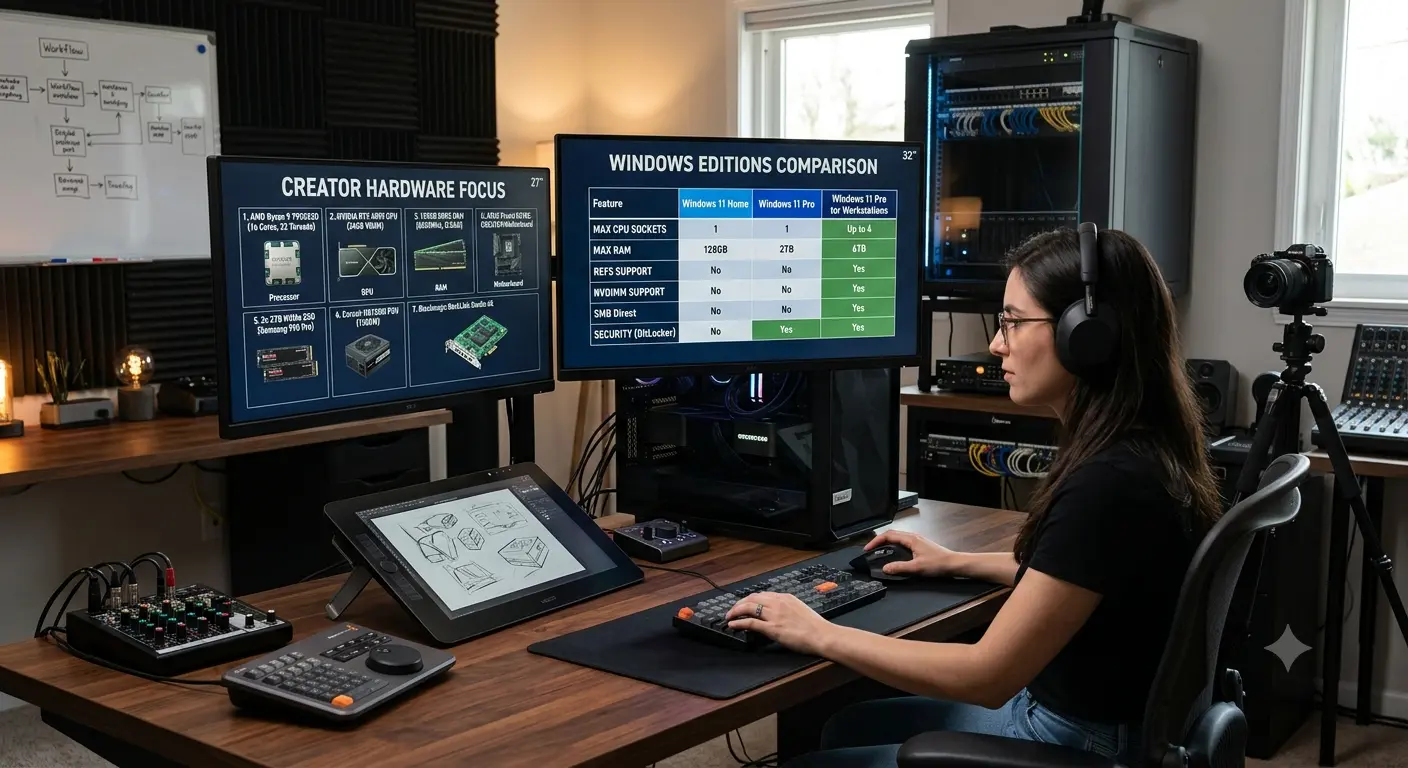
Windows Pro vs Pro for Workstations at a Glance
Gaming, Office, Hyper‑V, BitLocker and Remote Desktop are available on both editions. Workstations additionally supports enhanced ReFS capabilities, SMB Direct, Persistent Memory and significantly higher hardware limits.
It’s Not a Faster Version of Windows
Install both editions on identical hardware and you’ll see virtually identical performance. There is no secret gaming mode, rendering boost or hidden optimization. The difference is hardware support—not hardware acceleration.
What Is a Workstation?
True workstations are used by architects, engineers, scientific researchers, film studios and organizations running demanding simulations or virtualization workloads. Reliability matters more than squeezing out a few extra benchmark points.
ReFS: The Feature Most People Have Never Heard Of
ReFS (Resilient File System) is designed to improve resilience and handle extremely large storage environments. For enterprise storage, it’s valuable. For a typical home PC, NTFS remains perfectly adequate.
Higher Hardware Limits
Windows Pro already supports hardware beyond what most consumers own. Workstations extends those limits even further for specialized systems with multiple processors and enormous memory capacities.
Enterprise Reliability Matters More Than Raw Speed
The purpose of Windows Pro for Workstations is to improve reliability and scalability for enterprise hardware—not to make everyday PCs faster.
SMB Direct
SMB Direct uses RDMA-capable networking hardware to transfer files with minimal CPU overhead and lower latency. It’s excellent in enterprise environments but irrelevant on typical home or small-office networks.
Persistent Memory
Persistent Memory combines aspects of memory and storage for specialized enterprise workloads. Most desktop users will never encounter compatible hardware.
Does It Make Creative Software Faster?
Applications like Photoshop, Premiere Pro, DaVinci Resolve, Blender and AutoCAD perform the same on Windows Pro. Performance depends on your CPU, GPU, RAM and storage—not the Windows edition.
Who Should Buy Windows Pro for Workstations?
Choose Windows Pro for normal productivity, development, creative work, gaming and small businesses.
Choose Pro for Workstations only if you rely on ReFS, RDMA networking, enormous memory configurations, multiple physical CPUs or specialized engineering and scientific hardware.
Can You Upgrade Later?
Yes. You can upgrade from Windows Pro later if your requirements change, making it unnecessary to future-proof your purchase.
Common Buying Mistakes
Don’t assume the most expensive Windows edition is automatically the best. Don’t confuse premium consumer hardware with true workstation hardware. Also remember that Windows edition and licence type are separate decisions.
Final Verdict
Windows Pro for Workstations is an excellent operating system for a niche audience. For almost everyone—including gamers, creators, developers, students and small businesses—Windows Pro remains the smarter purchase because it delivers the same everyday experience without paying for enterprise features you’ll never use.