If you’re buying a new PC or upgrading Windows, you’ve probably asked the same question thousands of people search every month: Should I buy Windows 11 Home or Windows 11 Pro?
Microsoft’s comparison page lists dozens of features. That sounds helpful until you realize most people will never use half of them.
The real differences aren’t about long feature lists. They’re about how you use your computer every day.
For most home users, Windows 11 Home is enough. Windows 11 Pro earns its price only if you genuinely need business, security, or management features.
Windows 11 Home vs Pro at a Glance
• Home and Pro deliver the same everyday performance.
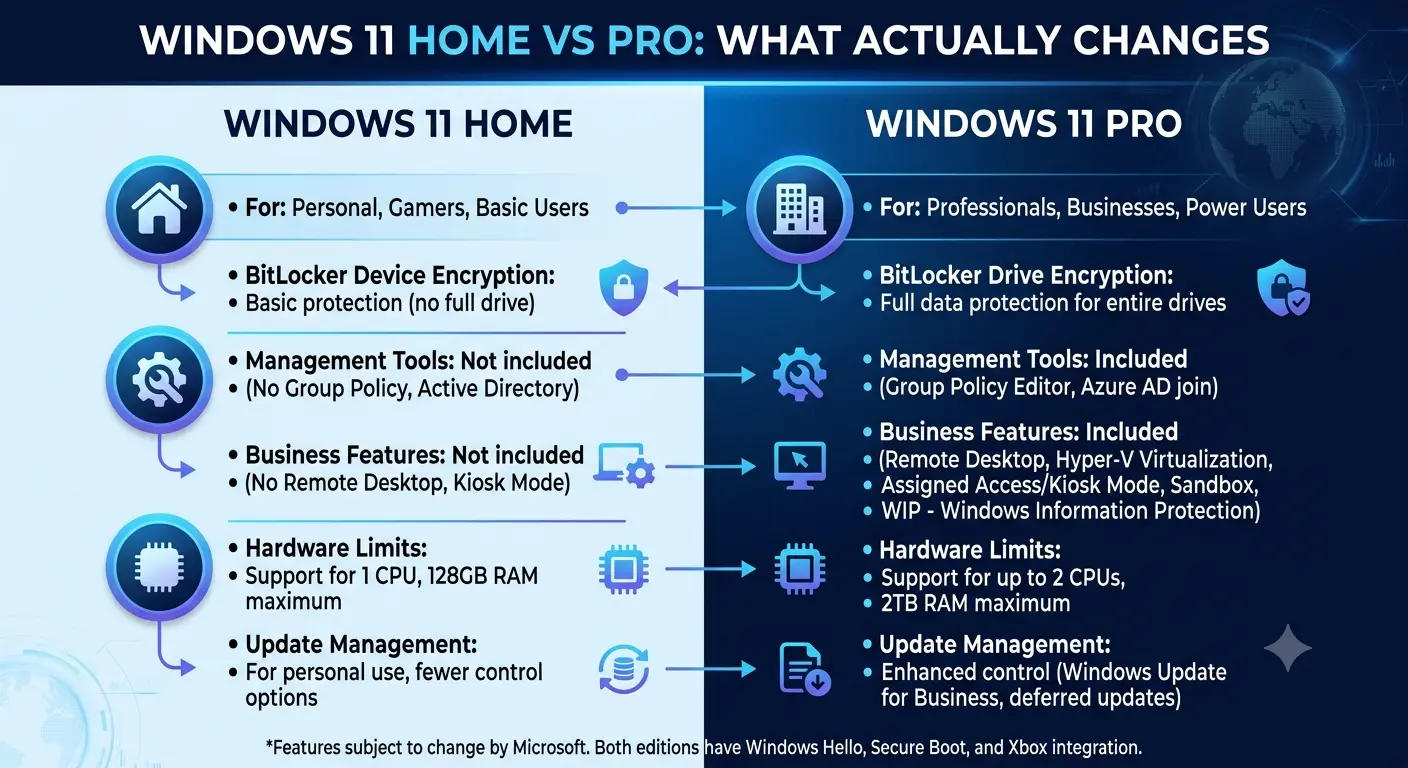
• Pro adds BitLocker, Remote Desktop hosting, Hyper‑V, Windows Sandbox, Group Policy, and business management features.
• Home remains the better value for most personal users.
Performance is effectively identical on the same hardware. Windows Pro does not improve gaming, battery life, or application speed.
BitLocker is one of the biggest practical differences because it encrypts your drive and protects data if a laptop is lost or stolen.
Remote Desktop hosting, Hyper‑V virtual machines, Windows Sandbox, and Group Policy are aimed at professionals, developers, and business environments.
If you browse, stream, play games, and use Microsoft Office, Windows Home is usually the right choice.
If you manage business devices, need virtualization, or require advanced security features, Windows Pro is worth the extra cost.
You can also start with Windows Home and upgrade to Pro later without reinstalling Windows.
Final Verdict
Windows 11 Pro is not a faster version of Windows. It’s simply designed for different users. Buy Pro for features you’ll actually use—not because you think it will make your PC perform better.