
Cloud storage has become one of the most common technology subscriptions. Whether you’re backing up family photos, storing work documents, or synchronizing files across devices, there are dozens of services competing for your monthly payment.
Most providers advertise storage plans using total capacity, such as 100 GB, 1 TB, or 2 TB. While these numbers are easy to compare, they don’t always tell the full story.
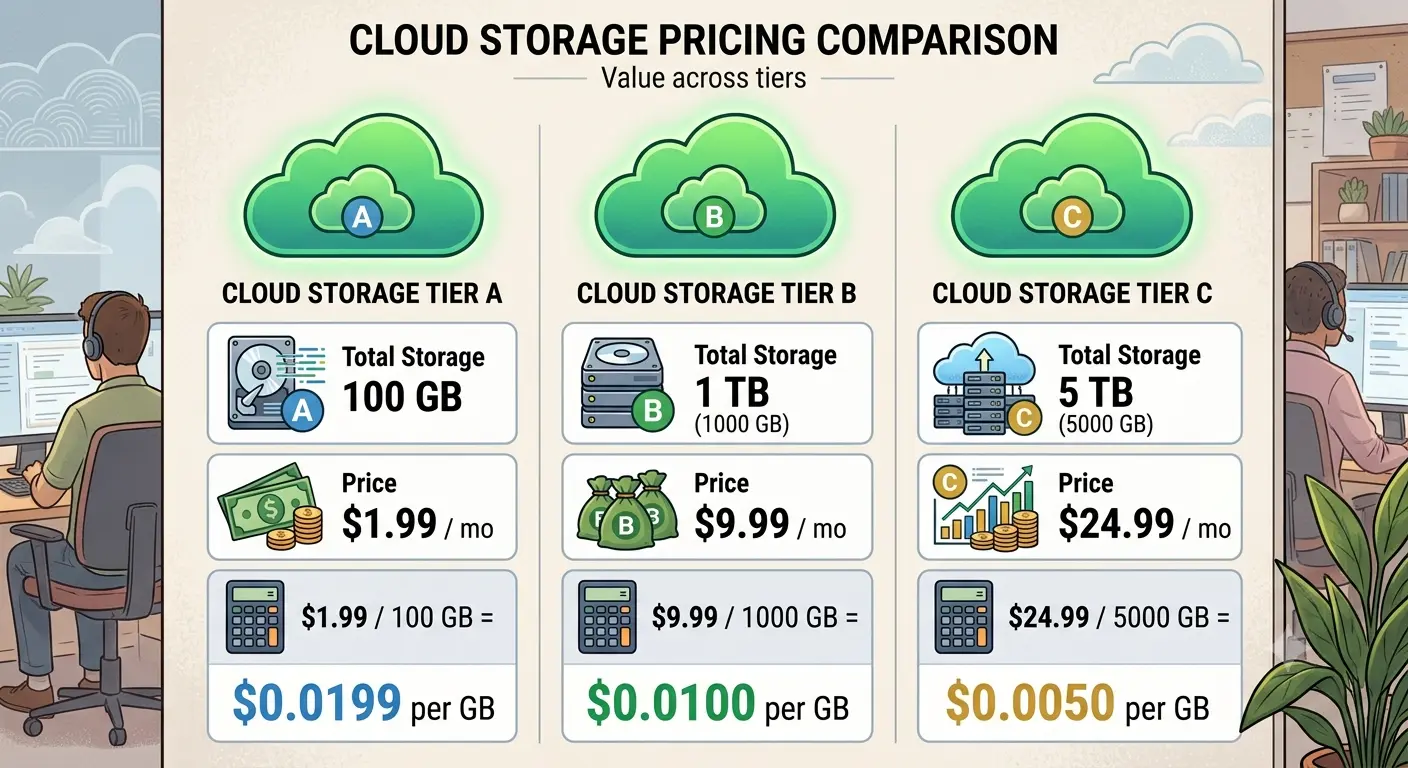
One of the simplest ways to evaluate value is by calculating the **price per gigabyte (GB)**. This makes it easier to compare plans with different storage capacities and pricing models.
However, price per GB should never be the only deciding factor. Features, privacy, collaboration tools, and ecosystem integration can easily justify paying more.
This guide explains how to compare cloud storage plans in 2026 and what really matters before subscribing.
Why Price Per GB Matters
Cloud providers package storage in different ways.
For example:
- One service may offer 200 GB for a low monthly fee.
- Another may include 2 TB plus productivity software.
- A third may provide lifetime storage through a one-time payment.
Looking only at the monthly price makes comparisons difficult.
Calculating the cost per GB creates a more consistent way to evaluate value across different plans.
Free Storage Isn’t Always Free
Most cloud services offer a free tier.
These plans are useful for occasional backups or basic document storage.
However, free plans often include limitations such as:
- Smaller storage allowances
- Reduced sharing features
- Limited collaboration tools
- Lower upload limits
- Fewer recovery options
As your storage needs grow, upgrading usually becomes necessary.
Large Plans Usually Offer Better Value
One interesting trend is that larger storage plans often reduce the effective cost per GB.
For example, a 2 TB plan frequently costs much less per GB than a 100 GB plan.
This doesn’t mean everyone should buy the largest plan.
Paying for unused storage rarely saves money.
Instead, choose the smallest plan that comfortably fits your current needs while leaving room for future growth.
Features Can Be Worth More Than Storage
Some subscriptions include much more than online storage.
Depending on the provider, additional benefits may include:
- Office applications
- Photo editing tools
- Password managers
- VPN services
- Family sharing
- Advanced security features
- File version history
When comparing services, consider the complete package instead of dividing price by storage alone.
Privacy Matters Too
The cheapest cloud storage provider may not be the best choice for sensitive files.
Before subscribing, review:
- Encryption methods
- Multi-factor authentication
- File recovery
- Version history
- Privacy policies
Security features often provide more long-term value than a slightly lower monthly subscription.
Hidden Costs to Watch For
Some cloud storage plans advertise attractive prices but include additional costs later.
Examples include:
- Higher renewal pricing
- Paid encryption add-ons
- Data transfer charges
- Recovery fees
- Premium collaboration features
Reading the pricing details carefully helps avoid unexpected expenses after subscribing.
Which Storage Size Should You Choose?
General guidelines include:
100–200 GB
Suitable for documents, email storage, and basic photo collections.
500 GB–1 TB
Suitable for large photo libraries, university work, small business files, and multiple devices.
2 TB or More
Suitable for families, video creators, photographers, long-term backups, and shared storage.
Should You Consider Lifetime Plans?
Evaluate company reputation, long-term sustainability, future support, and available features before purchasing lifetime storage.
Common Mistakes
Buying Storage You Never Use
Unused storage still represents unnecessary spending.
Ignoring Included Features
Consider bundled software and security tools.
Choosing Only by Price
Reliability, privacy, and support also matter.
Forgetting Local Backups
Keep an independent backup of important files.
Frequently Asked Questions
Is the cheapest cloud storage always the best?
No. Consider features and reliability.
How much cloud storage does the average user need?
Many users are comfortable with 100–200 GB, while families often benefit from 1–2 TB.
Should I upgrade before reaching my limit?
Yes, to avoid interruptions.
Is price per GB the only comparison that matters?
No. Consider security, bundled features, and long-term costs.
Final Thoughts
Compare cloud storage using price per GB, but also evaluate security, reliability, privacy, bundled features, and your actual storage needs.