
Software has become an essential part of daily life. Whether you’re writing documents, editing photos, managing a business, or simply browsing the web, almost every task relies on software that operates under a license.
Yet despite using licensed software every day, many people don’t fully understand what a software license actually is. Terms such as Retail, OEM, Volume License, Subscription, and Digital License often appear in product listings, but their meanings remain unclear.
This guide explains the most common software licensing models in straightforward language.
Quick Summary
- A software license gives permission to use software under specific terms.
- Buying software does not usually mean you own it.
- Retail licenses generally offer the greatest flexibility.
- OEM licenses are commonly tied to the original computer.
- Volume Licensing is designed for organizations.
- Subscription licenses provide continuous updates while payments remain active.
What Is a Software License?
A software license is a legal agreement that grants permission to use software under certain conditions. When you purchase software, you’re usually buying the right to use it rather than ownership of the software itself.
Why Does Software Licensing Exist?
Licensing protects intellectual property, funds ongoing development, delivers security updates, and helps prevent unauthorized distribution.
Software License vs Software Ownership
Licensing determines where software can be installed, whether it can be transferred, whether updates are included, and whether recurring payments are required.
Retail Licenses
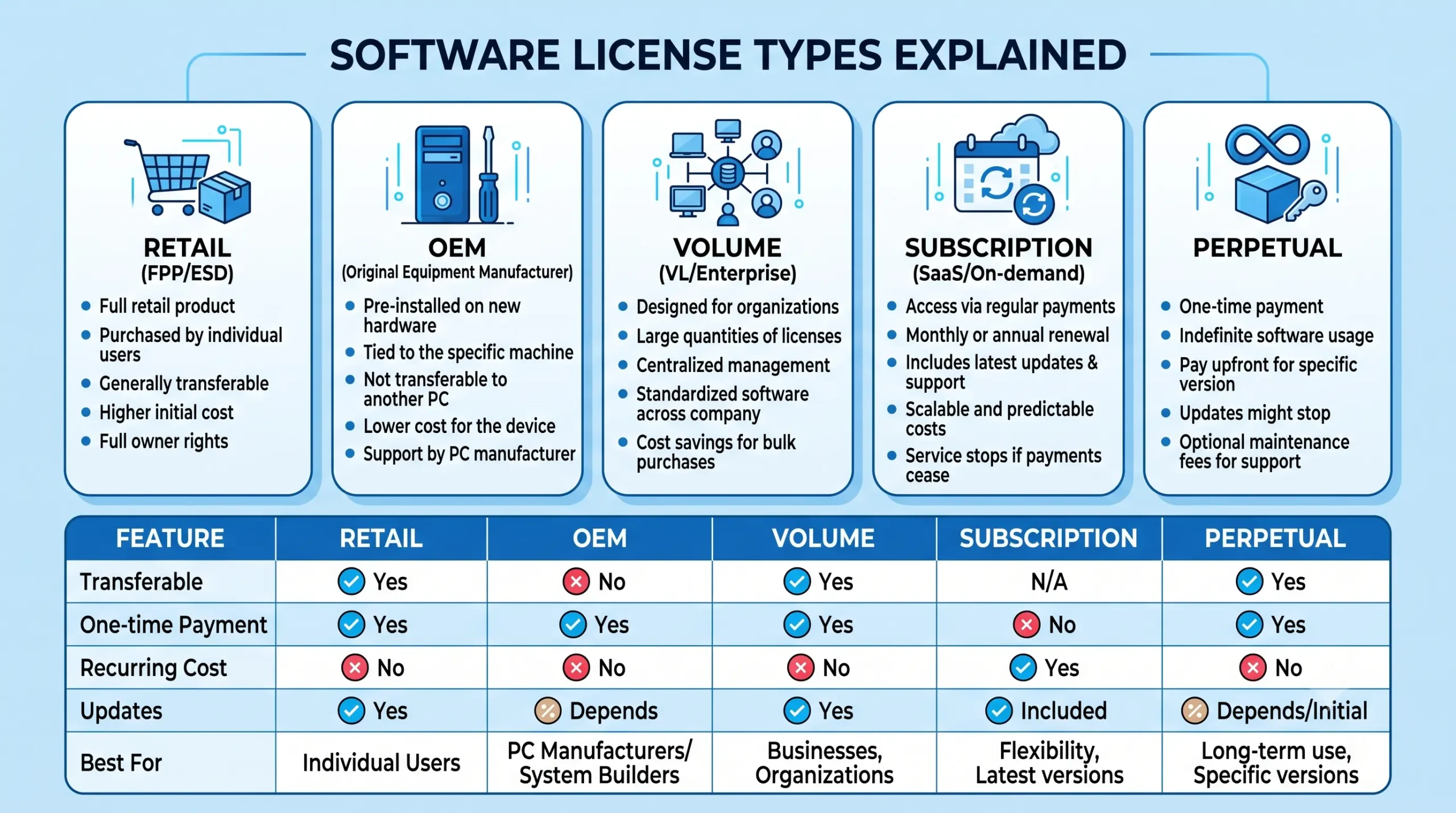
Retail licenses are sold individually and generally provide the greatest flexibility. They are commonly transferable to another compatible computer and suit home users, students, freelancers, and professionals.
OEM Licenses
OEM (Original Equipment Manufacturer) licenses are normally supplied with new computers and are usually tied to the original hardware. They typically cannot be transferred to a different computer.
Volume Licensing
Organizations often license software through centralized agreements that simplify deployment, activation, compliance, and administration across many devices.
Subscription Licensing
Subscription software provides ongoing access through monthly or annual payments. Examples include Microsoft 365 and Adobe Creative Cloud. Subscribers receive continuous updates, cloud services, and new features while the subscription remains active.
Perpetual Licenses
A perpetual license allows you to use a specific version of software indefinitely after making a one-time purchase. It generally includes security updates but not major future feature releases.
Open-Source Licensing
Open-source software such as LibreOffice, Blender, VLC, and Ubuntu is distributed under licenses that allow use, modification, and redistribution according to specific terms.
Product Keys Explained
A product key is a unique activation code. It helps verify a valid license but is not the license itself.
Digital Licenses
Digital licenses are stored on activation servers and may be linked to a Microsoft account, simplifying reinstalls and some hardware changes.
Understanding Software Activation
Activation verifies that your software license is valid. It does not change the legal rights granted by the license.
Can You Transfer a Software License?
Retail licenses are often transferable. OEM licenses are generally tied to the original computer. Volume and subscription licensing follow their own agreement terms.
Common Licensing Mistakes
- Buying the wrong edition
- Assuming activation equals ownership
- Ignoring transfer rights
- Focusing only on price
- Losing proof of purchase
Frequently Asked Questions
Do I own software after buying it?
Usually you purchase the right to use it.
What’s the difference between Retail and OEM?
Retail generally offers greater flexibility while OEM is usually tied to the original device.
Can I reinstall Windows?
Often yes, depending on the license.
How to Choose the Right License
Choose the license that matches how you use your software rather than simply choosing the cheapest or newest option.
Final Thoughts
Understanding Retail, OEM, Volume, Subscription, and Perpetual licensing helps you avoid expensive mistakes and choose software that fits your needs.
2 thoughts on “Software Licensing Explained: A Practical Guide to Retail, OEM, Volume, and Subscription Licenses”