
The Frustration of the Recurring Infection
You finally finished cleaning up your website dashboard. You deployed an automated malware scanner, deleted the infected system files, and saw your online store load perfectly again. You assume the problem is solved. You return to running your daily business operations. A week later, your customers complain about strange mobile redirects again. You log into your directory, and the exact same malicious code has returned.
This vicious cycle of constant cleaning and sudden reinfection happens to thousands of online businesses. It is an exhausting, frustrating experience for any store owner. Deleting visible malware code is only the first phase of a proper site recovery.
The primary objective of any skilled cybercriminal is to establish a permanent presence on your server. If you only clean the surface symptoms, they will use hidden access tokens to return. You must close every single entry point to stop the loop completely.
—
Understanding the Mechanics of Digital Backdoors
Think of website malware as a broken window inside a physical house. A backdoor is a tiny spare key that the intruder hides under the welcome mat. While active malware scripts perform loud tasks like stealing traffic, backdoors stay completely quiet. They wait patiently in the background until the hacker is ready to strike your server again.
If you clean your core directories but leave a hidden backdoor open, the hacker still holds full entry privileges. They simply execute a command from a remote terminal to reinstall their malicious scripts.
Cybercriminals spread these access links across multiple server layers simultaneously. This makes manual detection incredibly difficult. Finding every single backdoor requires a systematic search through your folders and database tables.
—
Stealth Administrator Profiles and User Role Hijacks
One of the easiest ways for a hacker to maintain server access is by creating unauthorized user profiles. Attackers often generate fake administrator accounts that blend in perfectly with your internal team names. You might find a new user account named support-tech or system-admin sitting quietly in your directory.
If you audit your code files but forget to check your active user tab, your site remains exposed. The attacker can simply log in through the front gate using their rogue credentials.
Review your entire WordPress user list immediately. Filter the screen to display only accounts holding full administrator capabilities. Delete any profile or email address that you do not explicitly recognize. After executing the deletion, force a mandatory password reset for all legitimate team members. If a hacker captured your session tokens during the first breach, they can walk right back in.
—
Injections Hidden Deep Within Your Database
Many website owners focus all their cleanup energy on physical server files. They completely ignore the database environment. This is a massive security oversight. Malicious PHP commands can live inside your options tables or post metadata records.
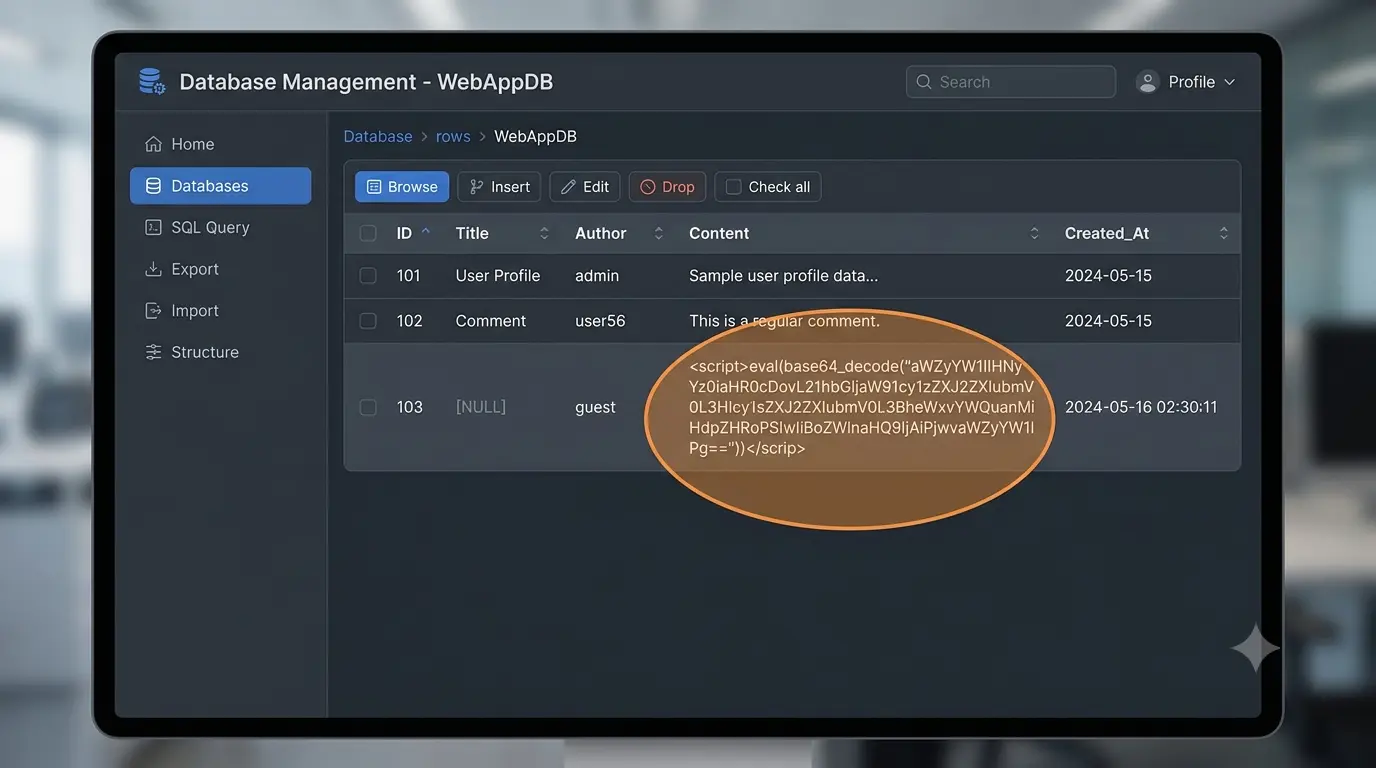
During a complex site cleanup, you might discover rogue databases running silently next to your legitimate store tables. Attackers inject encoded lines of text into the database structure. The second your homepage loads, the system pulls that text and runs the code.
This hidden process automatically regenerates the deleted files on your server storage. You must audit your database using cPanel tools like phpMyAdmin. Remove any tables that do not belong to your active plugins. Drop old comment logs and clear out fake post revisions to eliminate hiding places.
—
Exploiting Vulnerable Plugins and Theme Gaps
Outdated software plugins are a massive entry gate for automated hacking networks globally. When a popular plugin patch updates a major security flaw, hackers immediately analyze the fix. They build automated scripts to scan the web for sites still running the older version.
If you restore your website files but keep an unpatched plugin active, your defense line remains broken. The attacker’s script will simply exploit the exact same gap the very next day. You must apply all core software updates immediately after a site cleanup.
Furthermore, you must eliminate stale code blocks entirely. Deactivated plugins sitting idle on your server still present a major risk. An attacker can trigger a vulnerable script even if the plugin is turned off in your dashboard. Delete all unused themes and plugins from your server files.
—
Rogue Server Directories and Core File Changes
Cybercriminals frequently create entirely new folders on your server storage to host their phishing templates. They name these folders carefully to mimic legitimate system assets. They might use subtle variations of your own domain name to trick your staff during a quick file review.
They also make tiny, hidden modifications to core configuration documents that you rarely open. Attackers constantly alter the primary `.htaccess` and `wp-config.php` files to manage their background processes.
You must replace your core system directories with completely fresh copies from the official secure repository. Never trust a core configuration file just because the filename looks normal. Back up your unique database connection strings manually, then overwrite the root system files completely to ensure a clean start.
—
Hardening Server Access Rules and File Permissions
Closing the digital doors requires changing how your server handles file modifications. By default, many hosting setups leave file permissions too open. This allows active scripts to rewrite core files easily. You must change your file permissions to read-only for critical configurations.
Set your `wp-config.php` file permissions to a strict 440 or 400 framework. This completely blocks local scripts from modifying the database access credentials. Furthermore, you should audit your server’s web server configuration rules.
Add explicit block rules inside your server manager to prevent unauthorized access to hidden system files. Block external access to your backup files and installation logs. Hackers scan for leftover zip files from your cleanup work. If they find an old backup folder, they will extract it to find your secrets.
—
Establishing Permanent Long-Term Prevention
Stopping a recurring server infection demands a highly proactive containment strategy. You must block all PHP script execution inside your media uploads folder to freeze disguised files. Harden your server access rules using strict 410 redirect instructions to drop bad traffic automatically.
Most importantly, deploy a dedicated web firewall plugin to monitor system file integrity in real time. If your domain gets blacklisted by search engines, submit an official review request only after completing a total cleanup.
Protecting your underlying web infrastructure ensures your digital store can process orders safely. If you are looking to purchase genuine utilities to protect your professional operating setup, always source them from verified networks. You can check our online store to buy genuine security software keys to protect your digital business fully.