
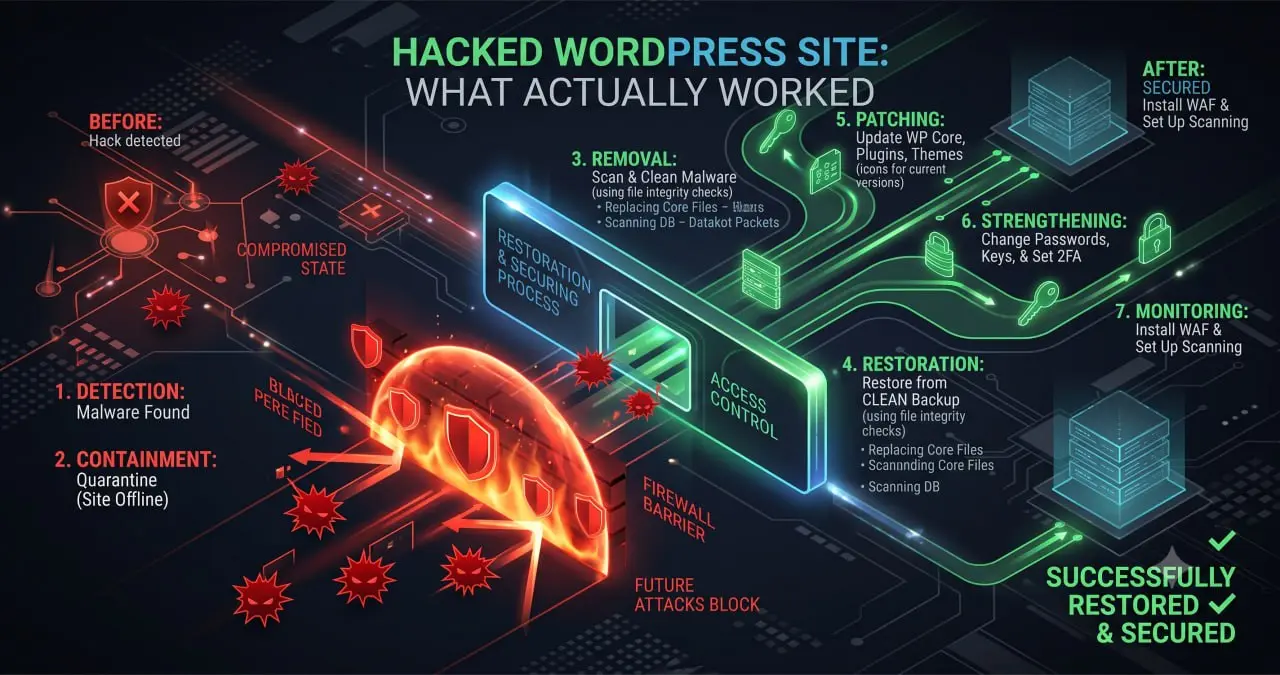
A hacked WordPress site rarely announces itself with a broken homepage. Mine looked fine for weeks. Traffic slipped, a few odd pages showed up in search, and only then did I dig in. What I found was a full compromise that started in a place I had stopped checking. This is the whole story, plus the exact steps I used to clean it and lock it down.
I am writing this because most hacked-site guides skip the messy middle. They tell you to “scan and restore” and move on. Real recovery is slower and more careful than that. If you run a WordPress site, this walkthrough will save you time and panic when your turn comes.
The first signs something was wrong
The earliest signal was not a warning. It was a slow, unexplained drop in search traffic across the whole site. Rankings that had been stable for months began sliding. I assumed it was an algorithm update and waited.
Then strange URLs appeared in Search Console. Pages I had never created were being indexed under my domain. Some pointed to spam content. Others redirected to sites I did not recognise. That was the moment guessing ended and investigation began.
Here is the lesson I wish I had known earlier. A hack often shows up as an SEO problem first, not a security popup. If your traffic falls with no clear cause, check for a breach before you blame the algorithm.
There were other quiet signals I had ignored. My hosting reported higher resource use than the traffic justified. A few visitors mentioned odd redirects on mobile that I could not reproduce on my own screen. Attackers often serve their spam only to certain visitors, which is why the owner sees a clean site while search engines and strangers see something else.
If you suspect a problem, check your site the way an outsider would. Open it in a private browser window, on mobile data, and through a search-result link rather than by typing the address. Cloaked hacks reveal themselves when you stop looking as the logged-in owner.
How the attackers actually got in
The entry point was a staging copy of the site sitting in a subdirectory. I had built it months earlier to test changes. Then I forgot about it. It was never updated, never patched, and never protected.
That forgotten staging install was running old plugin versions with known vulnerabilities. The main site was current. The staging copy was a soft target sharing the same server. Attackers found it, exploited it, and used it as a doorway to the wider account.
Once inside, they did not deface anything. A smart attacker wants to stay hidden and use your domain quietly. They planted code that injected spam pages and redirects, all while the visible site looked normal.
The single biggest lesson of this whole event is simple. Every install you run is a door. A staging site, an old test folder, an abandoned subdomain: each one is a way in if you stop maintaining it.
Finding the malicious code
The visible symptoms were spam URLs and redirects. The cause was hidden in several places at once. Cleaning one spot and stopping would have left the rest active. Thoroughness mattered more than speed.
I worked through the likely hiding places in order:
- Custom code snippets: a code-snippet tool held injected PHP that generated the spam pages on the fly.
- Theme and plugin files: modified core files with obfuscated code added at the top or bottom.
- The database: injected rows and altered options pointing to attacker content.
- Scheduled tasks: hidden cron jobs that quietly re-added the malicious code after each cleanup.
That last point is why so many people fail to fully clean a site. You remove the bad code, feel relieved, and it returns hours later. A scheduled task or a second hidden backdoor put it back. You have to find every copy before any single removal sticks.
A few habits made the search faster. I compared my files against fresh official copies, so anything extra stood out immediately. I searched the whole site for common markers that injected code tends to use, such as functions that decode or evaluate hidden text. I also read recently modified files first, because attackers leave timestamps behind unless they are careful.
The database took the most patience. Spam links and redirects can hide inside content, inside settings, and inside rows that look ordinary at a glance. I exported the database and read through it slowly rather than trusting a quick search. That is tedious work, but it is where a rushed cleanup usually leaves something behind.
The step-by-step cleanup I used
Recovery has an order. Do it out of order and you can lose data or reinfect a clean site. Here is the exact sequence that worked.
Step 1: Take the site offline or into maintenance mode.
Stop serving compromised pages to visitors and to search engines. Every hour a spam page stays live is more damage to clean up later.
Step 2: Take a full backup of the compromised state.
This sounds strange, but do it. You want a copy of the infected site for reference before you change anything. If cleanup goes wrong, you can compare against it.
Step 3: Change every password and secret.
Hosting, admin logins, database, and the site’s security keys. Assume the attacker has all current credentials. New passwords cut off their easy access while you work.
Step 4: Find and remove the malicious code everywhere.
Work through snippets, theme files, plugin files, the database, and scheduled tasks. Remove every copy. Do not stop at the first one you find, because there is almost always more than one.
Step 5: Replace core files with fresh copies.
Delete the WordPress core, theme, and plugin files, then reinstall clean versions from official sources. This is faster and safer than trying to spot every altered line by hand.
Step 6: Delete the entry point.
In my case that meant removing the forgotten staging install completely. If you do not remove the door they came through, they walk back in.
Step 7: Scan again from scratch.
Run a security scanner over the cleaned site. Then check manually for anything the scanner misses. A clean scan is reassuring, but your own eyes catch things automated tools do not.
Cleaning up the SEO damage
Removing the malware is only half the job. The spam pages the attacker created were already indexed by search engines. Left alone, they keep hurting your reputation and rankings for months.
Here is how I handled the search side of the recovery:
- Let the spam URLs return a proper not-found or gone status so search engines drop them naturally.
- Did not block those URLs in the crawl-control file, because blocking stops the crawler from seeing they are gone.
- Checked the site’s manual-actions report to confirm no penalty had been applied.
- Monitored indexing weekly until the spam pages fell out of the index.
That third point matters. A hack can trigger a manual penalty if a reviewer sees the spam before you clean it. Checking early tells you whether you face a simple cleanup or a longer appeal.
The counterintuitive rule here is the one people get wrong most often. To remove bad pages from search, you must let the crawler reach them and see they are gone. Blocking them keeps them stuck in the index forever.
See Gemini-002 for a detailed Guide
How long recovery really takes
The technical cleanup was the fast part. Removing the code and reinstalling clean files took a focused day of careful work. The search recovery took far longer, and that gap surprised me.
Search engines do not re-crawl every page the moment you fix it. The spam pages lingered in results for weeks after they were gone from the server. Rankings recovered slowly, in steps, as the index caught up with reality. There is no button that undoes the damage instantly.
This is worth setting expectations around. If someone promises to fully restore your traffic overnight, they are selling something. Honest recovery is a clean site first, then weeks of patient monitoring while search engines rebuild trust. Plan for the wait, and do not keep changing things in a panic while you wait.
The emotional part is real too. It is unsettling to know a stranger had control of your site. That feeling is also useful, because it is what finally pushes most owners to do the hardening they had skipped for years.
How I stopped it from happening again
A clean site is not a safe site. The same weaknesses that let them in the first time are still there unless you close them. Prevention is where recovery actually ends.
These are the hardening steps I put in place, in rough order of impact:
Remove what you do not use.
Every extra plugin, theme, and test install is attack surface. I deleted old staging copies, unused plugins, and abandoned subdomains. The fewer doors you have, the fewer you must guard.
Keep everything current.
Outdated software with known holes is the most common way in. I set a firm routine to update core, themes, and plugins, and to check that even inactive installs stay patched or get removed.
Install a real security layer.
A firewall and malware scanner will not stop every attack, but they raise the cost and catch the common ones. They also alert you early, which is the difference between an hour of cleanup and a week.
Lock down logins.
Strong unique passwords and two-factor authentication on every admin account. Most attacks are opportunistic. A login that resists brute force sends them looking for an easier target.
Back up on a schedule, and store copies off the server.
A recent clean backup turns a disaster into an inconvenience. Keep copies somewhere separate from the site, so a server compromise cannot reach them too.
Audit the forgotten corners.
Once a quarter, list everything running under your domain. Subdomains, staging folders, old installs. If you do not need it, remove it. If you do, patch it like it is production, because to an attacker it is.
Warning signs worth checking today
You do not need to wait for a crisis to look. A short check now can catch a problem while it is still small. These are the signals I pay attention to on any site I run.
- Search traffic dropping with no algorithm update to explain it.
- Pages in Search Console that you never created.
- Redirects that appear only on mobile, or only through search links.
- Server resource use that is high for your actual traffic.
- Login attempts from locations and times that make no sense for you.
- Files changed on dates when you made no changes.
If two or three of these are true at once, treat it as a likely breach and investigate properly. Catching a hack in week one is a very different job from catching it in month three.
What this whole experience taught me
The hack did not succeed because WordPress is weak. It succeeded because I left a door open and stopped watching it. The main site was maintained. The forgotten copy was not. Attackers do not need the front door if the side gate is left open.
If you take one thing from this, make it this: your security is only as strong as the least-maintained thing running under your domain. Find those neglected corners before someone else does.
Recovery is possible, and it is not magic. It is patient, ordered work: find every piece, clean in the right sequence, repair the search damage, and close the entry point for good. Do that, and a hacked site becomes a hard lesson rather than a lasting loss.
1 thought on “I Recovered a Hacked WordPress Site: What Broke, How I Cleaned It, and How I Stopped It Coming Back”